How to Hire the Best WordPress Security Expert for Your Site

Imagine waking up to find that your website visitors are being redirected to suspicious sites or spam ads are popping up on your homepage. At first, it might look like a random glitch. Then you realize it’s a deeper problem, and it won’t go away without the right WordPress security expert by your side.

Every thriving online business needs a reliable defense system to keep its site safe. Hackers roam the internet, always on the hunt for weak spots. A single successful breach can destroy your data and stain your reputation, sometimes beyond repair. 

Since online threats grow more sophisticated by the day, your WordPress site needs constant vigilance to stay secure. Hiring an expert today sets you up for worry-free growth tomorrow. It might seem like an extra expense at first, but that modest investment will pay off in long-term peace of mind.

In this guide, we’ll walk you through the entire process of finding and hiring your ideal WordPress security professional. You’ll learn how to evaluate candidates, set realistic budgets, and avoid the pitfalls many business owners face. We’ll also compare the top platforms to locate these specialists.

Why WordPress Security Should Be Your Top Priority

In 2024, there was a 34% increase in reported WordPress vulnerabilities compared to the previous year, totaling 7,964 cases. Common threats include brute force attacks, where hackers attempt numerous username and password combinations to gain access, and malware injections that can compromise site integrity. 

The alarming figure above shows just how common cyberattacks have become in the modern online landscape. This doesn’t even include the number of hacking attempts that go unreported or remain undetected every single day. When these attacks succeed, they can quickly spread to other parts of your digital ecosystem, creating a chain reaction that’s difficult and costly to contain.

Potential Risks of Neglecting Security

Did you know that the average cost of a data breach in 2024 was approximately $4.88 million? If you ignore proper security measures for your website, you risk more than just a temporary shutdown.

A successful hack can also ruin your brand’s credibility, which often translates into lost business opportunities and a drop in customer trust. In extreme cases, hackers may access sensitive data like customer information or financial records. This places you in violation of privacy laws and exposes you to potential lawsuits.

Moreover, a hacked site often suffers from search engine penalties if malicious links and spam content are found.

In such a high-risk environment, having a WordPress security expert on your side is a game-changer. An expert understands the latest hacking methods and knows how to defend against them effectively. And in case an attack does happen, they also know how to quickly isolate the breach and minimize damage.

How to Spot Weak Security

Weak security doesn’t always present itself as an obvious intrusion. In many cases, early warning signs include unusual spikes in site traffic from unknown sources, slow-loading pages, or random redirects to unrecognized domains.

If your WordPress dashboard takes too long to load or you notice strange file names in your directory, these could be indications that something’s amiss under the hood.

Site performance often serves as a canary in the coal mine. Even a slight slowdown might hint at hidden malware or unauthorized scripts running in the background. That’s why regularly monitoring your analytics and server logs is essential. 

A skilled WordPress security expert can interpret these subtle signals and pinpoint issues before they escalate. They can also implement tools to catch suspicious activity as it happens, giving you real-time alerts and faster response times.

What Makes a Great WordPress Security Expert

You’re already convinced you need a WordPress security expert by your side. But how do you know that person is really an expert? Here are important things that you need to look for.

Core Technical Proficiency

A strong foundation in coding standards is a must. Experts should know how to review themes, plugins, and custom code for vulnerabilities that hackers often exploit. 

In addition, a WordPress security expert should be well-versed in server-side configurations like .htaccess rules, file permissions, and firewall setups. This includes the ability to use advanced techniques such as malware detection, penetration testing, and real-time monitoring.

Finally, knowledge of performance optimization tools also helps in detecting unusual server loads.

Analytical Thinking and Problem-Solving

A great WordPress security expert is more than just a technician. They are also adept at diagnosing complex security threats that may hide behind seemingly innocent errors. This skill involves using logs, analytics, and specialized software to discover subtle vulnerabilities.

One key aspect is the ability to deliver rapid solutions that target the root cause, rather than applying temporary fixes. A fast response not only protects your data but also ensures minimal downtime for your site visitors.

Furthermore, problem-solving extends to future-proofing your site against emerging threats. By keeping up with industry trends and software updates, a WordPress security expert makes sure your website remains secure for the long haul. Their capacity to anticipate new risks can save you from repeated cleanup costs.

Clear Communication and Reporting

The best security strategy means little if you don’t know what’s happening behind the scenes. Detailed progress updates and transparent documentation allow you, as the site owner, to stay informed about changes being made.

Clear communication is crucial in aligning your expectations with the expert’s workflow.

Regular reports after each audit or security event foster trust and accountability. It also creates a valuable record that can be used for future reference if similar issues arise again.

Finally, a WordPress security expert who communicates well helps reduce anxiety and confusion during high-pressure situations like active hacks. They break down technical jargon into easy-to-understand terms so you can make informed decisions about your site’s protection, even if you’re not a security professional yourself.

Exploring the Must-Have WordPress Security Services

Below are four essential WordPress security services that you can avail of to protect your website from cyber threats.

Complete Security Audits

A comprehensive audit is the cornerstone of any robust security strategy. During this process, a WordPress security expert will:

  • Scan your site for vulnerable themes, plugins, and core files.
  • Inspect server logs, database entries, and access controls for red flags.
  • Evaluate password policies to ensure they meet current security standards.

Identifying vulnerabilities before hackers exploit them saves you from major headaches down the line.

Advanced Malware Removal

Malware doesn’t just slow down your site—it can also steal data, redirect visitors to malicious pages, or even crash your site entirely. During malware removal, a WordPress security expert will:

  • Perform in-depth scans using tools like Wordfence or MalCare.
  • Identify and isolate infected files, databases, and code snippets.
  • Clean and secure every layer of your site, ensuring malicious scripts cannot reinfect it.

After cleansing the threat, experts often recommend follow-up strategies such as frequent scans, strong password hygiene, and regular plugin updates.

Site Hardening and Ongoing Maintenance

Simply removing threats won’t guarantee long-term safety. You need ongoing maintenance to stay ahead of new hacking techniques. Essential steps include:

  • Firewall Installation: Blocks suspicious traffic and filters out harmful IP addresses.
  • Regular Backups: Ensures you can quickly restore your site to a previous version if an attack does occur.
  • SSL Certificates: Encrypt data transmissions, protecting user information like passwords and payment details.

Routine updates of your WordPress core, themes, and plugins also play a key role in security. A WordPress security expert keeps tabs on new patches and improvements so your site won’t become an easy target.

Tailored Security Solutions

Every website has different needs, which is why customized security measures are critical. These might include:

  • E-Commerce Protection: Installing specialized firewalls to guard credit card transactions.
  • Membership Site Safeguards: Monitoring user access levels to protect private content, and setting up two-factor authentication.
  • Custom Scripts or Plugins: Developing bespoke solutions for niche industries or special site functionalities.

Tailoring security to your specific goals allows your site to run smoothly while remaining fortified against emerging threats. A WordPress security expert will work closely with you to design measures that fit your needs.

Best Platforms to Hire a WordPress Security Expert

Finding the right WordPress security expert can feel overwhelming if you don’t know where to look. Thankfully, several platforms cater to varying budgets, timelines, and project requirements.

Freelance Marketplaces

Freelance marketplaces are a go-to choice for many business owners because of their large talent pools and user-friendly interfaces. These platforms let you browse profiles, read reviews, and compare rates quickly.

You can post jobs with detailed requirements and let experts bid for your project, or you can handpick potential candidates based on skill level and experience.

Upwork

Using Upwork to find your wordpress security expert
  • Talent Pool: With millions of freelancers on the platform, Upwork offers a vast pool of WordPress professionals.
  • Transparency: Each freelancer has a rating, plus detailed feedback from past clients.
  • Payment Protection: Safe escrow systems protect both parties during the hiring process.

One benefit of Upwork is its advanced search filters. You can narrow your search to “WordPress Security,” “Malware Removal,” or even specific qualifications like “PHP” or “Security Certification.”

While rates vary widely, you’ll likely find someone who fits your budget, whether that’s an entry-level tech or a seasoned pro.

Fiverr
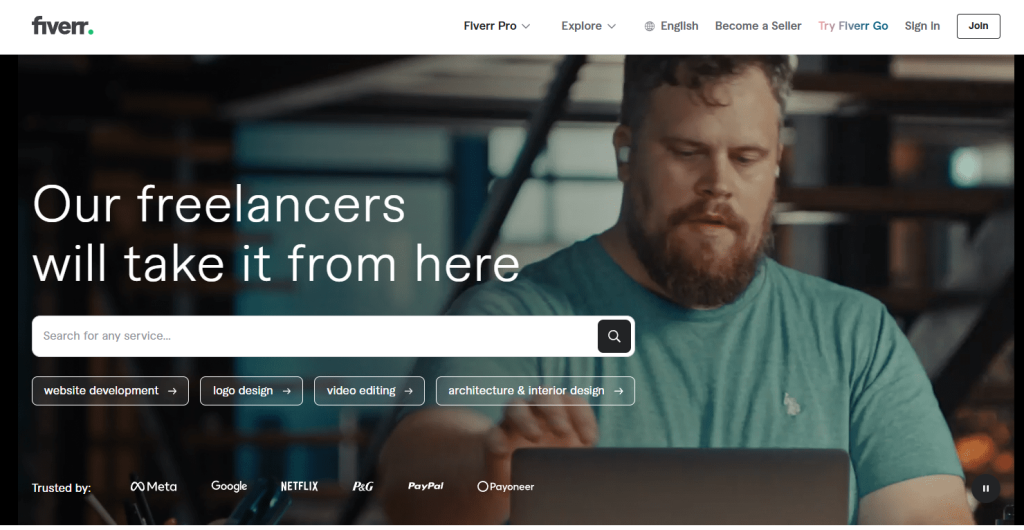
Using Fiverr to find your wordpress security expert
  • Quick Setup: Fiverr has an easy-to-navigate system where you can hire a WordPress security expert with just a few clicks.
  • Package Deals: Many sellers offer set packages that outline exactly what’s included, like malware removal or one-time audits.
  • Fast Delivery Options: Some freelancers even advertise 24-hour or same-day services.

Fiverr is well-known for its affordable “gig” model. If you only need a short-term fix, this might be your best option. However, it’s wise to compare multiple sellers and read reviews carefully for more complex or ongoing security needs.

PeoplePerHour
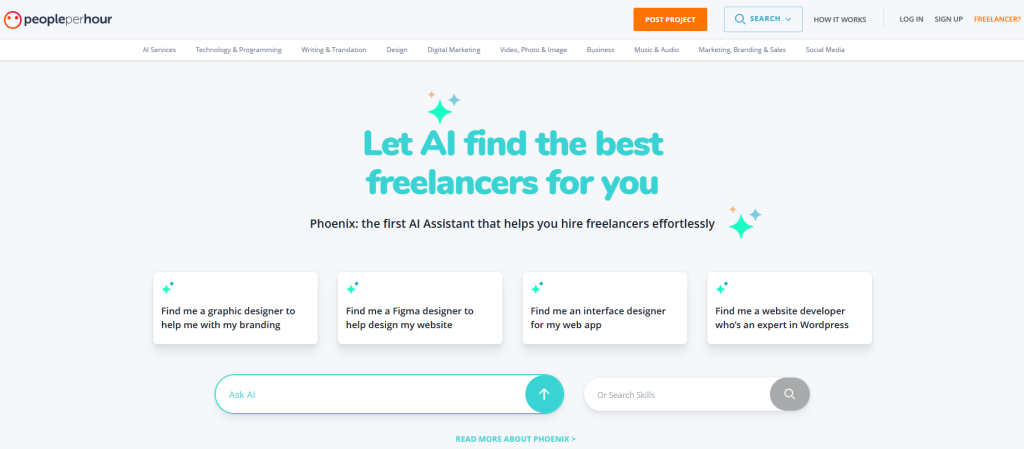
PeoplePerHour
  • Flexible Pricing: You can choose hourly rates or fixed-price projects.
  • Targeted Hiring: Like Upwork, you can post a job and let experts bid, or you can search based on predefined categories.
  • Built-In Communication Tools: It’s easy to discuss project details and share updates within the platform.

PeoplePerHour serves a global market but has a strong presence in the UK and Europe. It’s less crowded than some larger sites, which can be an advantage if you want a more personalized approach.

Just be sure to include your specific WordPress security needs in your job listing to attract the right candidates.

Premium Talent Networks

If you need a higher level of expertise and are willing to pay more for it, premium talent networks are worth considering. These networks often vet their professionals extensively.

Toptal

Toptal
  • Rigorous Screening: Toptal accepts only the top 3% of freelance applicants, providing a curated list of high-level talent.
  • Quality Assurance: Each WordPress security expert is tested on technical ability, problem-solving skills, and communication.
  • Tailored Matching: Toptal assigns you a specialist based on your specific project requirements.

While Toptal’s pool is smaller than most freelance marketplaces, the quality tends to be higher. It’s also important to take note that their premium approach comes with higher costs, so be prepared for a bigger investment. Still, if you have a critical website handling sensitive data, the peace of mind might be well worth it.

LinkedIn and Direct Networking

Platforms like LinkedIn can also be valuable for finding a WordPress security expert. Posting a job opening or sending direct messages to professionals in WordPress-focused groups often yields quick responses. When you’re browsing LinkedIn:

  • Check Endorsements and Recommendations: Social proof from colleagues can indicate reliability.
  • Look for Relevant Keywords: Searching “WordPress Security” or “WordPress Malware Removal” helps you find the right talent.
  • Engage in WordPress Groups: Participate in discussions where experts often showcase their knowledge and skills.

Direct networking can also include WordCamps and local meetups, where you can meet specialists face-to-face. These events are a hub for WordPress enthusiasts, developers, and security pros. Building relationships in person may lead to trustworthy referrals and valuable partnerships.

Niche Job Boards and Developer Communities

Finally, niche platforms focus specifically on WordPress or software development. These can be goldmines for specialized talent.

WP Hired

  • WordPress-Focused Listings: It hosts job postings exclusively related to WordPress.
  • Suitable for All Levels: Whether you’re looking for an experienced WordPress security expert or someone to do basic support, the platform covers it.
  • Straightforward Format: Clear job listings make it easy for candidates to see exactly what you need.

Since many WordPress professionals check the site regularly, your posting can attract quality applicants quickly. Make sure to detail your security concerns, current site issues, and budget to set realistic expectations from the start.

Developer Forums (GitHub, Stack Overflow)

  • Community-Driven: Developers share code, ask questions, and showcase their expertise.
  • Direct Contact: You can message contributors who have demonstrated a deep understanding of WordPress security.
  • Portfolio Insights: Reviewing public repositories or user profiles can help you gauge skill levels.

If you have specific or complex security needs, reaching out to someone who’s actively contributing to open-source projects can be a great move. You might find someone who not only knows how to fix issues but also writes code to prevent future attacks.

How to Budget for Hiring a WordPress Security Expert

When hiring a WordPress security expert, you’ll typically come across two main payment models: hourly contracts and fixed-price contracts. 

Hourly contracts allow for a more flexible work structure since you only pay for the actual hours spent on the project. This is especially useful when the scope of work may change over time, such as when new vulnerabilities are discovered.

On the downside, it can lead to unpredictable costs if the security issue is more complex than originally anticipated.

WordPress security professionals charge anywhere from $40 to $100 per hour, sometimes higher, depending on their experience level and the tasks required.

Fixed-price contracts, on the other hand, provide clearer boundaries for both budget and deliverables. You agree to a set fee upfront, which can make financial planning easier and reduce the risk of surprise expenses. 

This arrangement works best when your security goals are well-defined because it limits the need to renegotiate costs. However, if the project scope expands or additional threats arise, adjusting the agreement would be necessary.

A Step-by-Step Guide to Hiring the Best WordPress Security Expert

1. Define Your Requirements

Before you start looking for an expert, clarify your goals. Are you seeking a one-time fix, like removing malware, or do you need ongoing maintenance that includes regular security scans and updates? 

Document these needs in a detailed scope of work. Define key performance indicators (KPIs) if you have to.

2. Screen and Shortlist Candidates

Begin by browsing freelance platforms, specialized job boards, or professional networks for individuals who advertise their expertise in WordPress security. Filter out candidates based on:

  • Reviews and Testimonials: Positive feedback and repeat clients suggest reliability.
  • Portfolios: Look for evidence of past security projects and successful outcomes.
  • Certifications: Certain credentials, like CEH (Certified Ethical Hacker), can be a bonus.

Once you’ve identified a pool of promising applicants, compile a shortlist for you to assess.

3. Conduct Effective Interviews

An interview is your chance to gauge a candidate’s depth of knowledge and how well they communicate. Ask about real-world security challenges they’ve solved and the tools or methods they used:

  • Scenario-Based Questions: “How would you handle a brute force attack?”
  • Problem-Solving Focus: “Describe a complex issue you’ve encountered, and how you fixed it.”

Also, assess their availability and responsiveness. Since site security can require quick intervention, choosing a WordPress security expert with reliable communication can save you from prolonged downtime in an emergency.

4. Compare Proposals and Quotes

Once you’ve conducted interviews, request detailed proposals that outline deliverables, timelines, and costs. Pay attention to how itemized these quotes are. Vague proposals without clear objectives or pricing structures can lead to misunderstandings and unexpected expenses later.

It’s also wise to compare multiple bids to ensure you’re getting a fair rate. Some experts may charge hourly, while others might offer flat fees for specific services.

5. Negotiate and Finalize Contracts

After selecting your ideal candidate, finalize the terms of your partnership. Include clear confidentiality clauses and specify what data they’ll have access to, especially if you store sensitive customer information. Arrange milestones for accountability—this could involve scheduled check-ins or regular update reports.

Building a Lasting Partnership with Your WordPress Security Expert

Once you’ve hired a WordPress security expert, your relationship shouldn’t end after a single project or crisis fix. Cyber threats evolve rapidly, and a stable, ongoing partnership helps you stay a step ahead of hackers. 

Below are three key areas to focus on when maintaining a long-term working relationship with your security professional.

Consistent Check-Ins and Updates

Scheduling routine audits helps you detect new vulnerabilities or performance issues before they escalate.

  • Monthly or Quarterly Audits: Discuss any changes in plugins, themes, or hosting environments, and let your expert run a thorough scan.
  • Collaborative Reviews: Use these sessions to talk about site performance, user feedback, and potential new features that might affect security.
  • Actionable Feedback: A good WordPress security expert will provide clear recommendations you can act on swiftly.

Scaling Up as Your Site Grows

Your security measures should grow alongside your website’s success. A surge in traffic, new product lines, or expanded user databases often requires more robust protection.

  • Hosting Upgrades: When visitor numbers increase, you may need dedicated or VPS hosting with better server-level security.
  • Advanced Firewalls and Intrusion Detection: As your online presence grows, adding extra layers, such as Cloudflare’s Web Application Firewall, can help thwart more sophisticated attacks.
  • Tailored Strategies: A seasoned WordPress security expert can recommend solutions specific to your niche, such as enhanced payment gateways for e-commerce or deeper privacy controls for membership sites.

Planning Long-Term Contracts and Retainers

For consistent protection, many businesses opt for ongoing agreements with their WordPress security expert. These retainers typically outline regular tasks like malware scans, plugin updates, and performance monitoring.

Once you commit to a monthly or yearly schedule, you can expect a predictable budget and guaranteed response times, especially during emergencies.

Additionally, long-term contracts cultivate a strong sense of partnership. Rather than scrambling for help when a breach occurs, you’ll have an expert on call who already knows your system’s nuances.

FAQs About Hiring WordPress Security Experts

Why do I need a WordPress security expert for my website?

Having a specialist ensures your site remains protected from ever-evolving cyberattacks. A WordPress security expert helps you prevent downtime, loss of data, and damage to your online reputation.

How can I find a reliable WordPress security expert?

Look for professionals with verifiable experience, strong client testimonials, and relevant certifications. Platforms like Upwork, LinkedIn, and niche job boards dedicated to WordPress often feature qualified experts with proven track records.

Should I hire a WordPress security expert only after a hack occurs?

It’s best to hire a specialist before a breach happens. Proactive measures, such as regular security audits and updates, often cost less than recovering from a serious hacking incident.

How do I choose between hourly and fixed-price contracts?

If your project scope is flexible, hourly contracts allow for easier adjustments. If you have clear security goals, a fixed-price model can provide predictable costs and deliverables.

How often should my WordPress security expert conduct audits?

Frequency varies based on your site’s complexity and traffic, but monthly or quarterly audits are common.

Can a WordPress security expert improve my site’s performance as well?

While their primary goal is protection, many experts also optimize your site during the security process. Cleaning up malicious code and optimizing configurations often boosts site speed and reliability.

What if I have a limited budget for security?

Even if funds are tight, you can start with a basic security audit and a few critical fixes. Over time, you can scale up services as needed to maintain more robust protection.

Your Next Move: A Stronger, Safer WordPress Site

Hiring the right WordPress security expert can transform your business. It goes beyond simply patching holes or removing malware. Instead, you gain a partner who actively safeguards your online presence, fortifying it against emerging threats.

This level of protection frees you to focus on what you do best: delivering great products, valuable content, and top-notch services to your audience.

As you finalize your decision, remember that investing in reliable security today often saves you from massive losses tomorrow. The path to a secure site may involve research, vetting, and ongoing collaboration, but the peace of mind it gives is definitely worth it.

The post How to Hire the Best WordPress Security Expert for Your Site appeared first on GreenGeeks Blog.

Share:

Top Trends Shaping Marketing Budgets & Spending in 2025

Increasing the traffic your website receives relies heavily on your marketing efforts. While you can do a lot of marketing for free, most sites have dedicated marketing budgets to help them reach a wider audience quicker.

However, that budget changes yearly as market conditions change and more data becomes available. As such, marketing is an ever-changing science that sites must adapt to, or risk falling behind the competition.

Luckily, many business’s marketing strategies are on full display, so it is easy to see what your competition is doing. This can give you an idea of how much they are spending and where they are spending it.

Today, we will cover the trends that drive marketing budgets in 2025.

What Is a Marketing Budget?

Marketing budgets are outline budgets that break down the specific amount of money a company spends on a specific marketing activity. They also include the rationale for the money being spent on that particular item.

Having a marketing budget in place helps you better understand how your money is being spent. You can then compare what you spend against what you gain in different categories to help reshape future budgets.

For example, let’s say you notice that you spent the same amount of money on Google and Bing ads, but Google ads are generating more engagement. You will most likely want to decrease Bing ads investment and increase Google ads investment.

That is just a simple example. Marketing efforts today are very broad, thus it can sometimes be difficult to quantify.

It is also worth pointing out that market conditions and priorities can change drastically. For example, if there is one trend that is dominating marketing teams today, it would be AI adoption.

Nearly every marketing team is adopting AI to bolster its SEO efforts. Thus, every budget needs to be restructured to account for this spending. As such, budgets can change drastically sometimes to account for these new trends.

How Do I Allocate My Marketing Budget?

Marketing budgets wildly and largely depend on what industry you are in. Thus, there is not a one-size-fits-all solution.

For example, imagine your local mom-and-pop restaurant. They are going to market the business on a local level, which means focusing on local SEO efforts, which can entail things like handing out fliers, placing signs, or even renting a billboard.

In comparison, an eCommerce site would not do any of this. Instead, they would want to focus on purchasing ad space, improving their SEO, social media, and a variety of other factors. While they both will have a marketing budget, they will be incredibly different.

Even with this in mind, there are a few simple rules most marketing teams follow when structuring a budget.

First and foremost, decide on the total budget before you begin allocating anything. In 2024, the average company allocated 7.7% of its total budget to marketing efforts. As such, you can expect something similar for 2025.

Once you have this number, start breaking down the different ways you will spend that money. If this is your first time, consider looking up what competitors did the previous year, as much of this information is publicly available.

Let’s examine the most common areas in which marketing teams spend their budgets.

SEO

Search engine optimization or SEO continues to be a major part of any marketing strategy. While there are still concerns that AI search results will impact traffic received through searches, so far, it has not.

As such, the majority of marketers are looking to either increase their SEO budget or leave it the same as the previous year.

Now you may be wondering, how exactly do I spend money on SEO? It is a very broad topic and consists of a few staples. The first way to directly spend money on SEO efforts is to improve your website’s performance.

One of the few known factors of the Google algorithm is speed. As such, for a website to rank highly, it must load fast. Another technical improvement to be made is to optimize the mobile version of your site.

Google adopted mobile-first indexing in 2016, thus the mobile version of your site is what is being ranked.

Another key component of SEO spending is keyword research. While there are free options to perform keyword research, most companies use premium options to get the best data available.

Naturally, the entire reason a company does keyword research is to create content around that keyword. As such, content creation typically also falls under the SEO umbrella. That said, some businesses may separate the two.

Yet another way to spend money on SEO efforts is to bolster your internal and external linking. Having more trusted websites creating links to your website improves your site’s rankings, thus, buying backlinks is a valid strategy.

Email Marketing

While it feels like every day that someone is claiming email marketing is dead, the truth is it is better than ever. For every dollar spent, businesses typically see a $42 return on that dollar. As such, you should be using email marketing.

Luckily, email marketing has been simplified by how popular it is today.

Many businesses will purchase email marketing software like MailChimp which specializes in the creation of promotional email material and allows you to send out any number of emails daily.

That said, it can often take time for email marketing to be a big part of your business, as the true cost of email marketing is the number of emails you are sending out. Thus, the budget of a company that has 50 subscribers will be very different from one with 10,000.

Some businesses also hire professional designers to design the emails they send. In some cases, businesses will also design emails for specific customer groups. It’s common for a single promotion to have several varieties of emails.

Another expense in this field is A/B testing. This is a practice where a company sends out one email to one group of subscribers, and another to a different group. It then compiles the results and allows you to see which one works better.

Email marketing software charges a premium for these services. This often increases the cost depending on how much you add to the message.

Paid Digital Advertisements

Buying ad space is one of the most common components of a marketing budget. This is because paid ads like Google Ads have a clear ROI. After all, they can directly target the audience you want them to.

However, Google is not the only option to consider anymore.

A growing player is Bing Ads. Many marketing teams are beginning to allocate more resources to them because the space is less crowded. This means you can buy more ads for less money. That said, it also has a lower ROI.

We are also seeing more investment in paid advertisements on social media platforms. Many companies today are increasing spending on X because the ads are more affordable than other platforms.

With that said, advertisement spending will also increase drastically on YouTube as it is getting great results between paid ads and buying ad space directly from YouTubers.

Most other platforms will see budgeting stay the same. Again, these platforms have a clear positive ROI, but when it comes to platforms like Facebook and Instagram, other platforms have more growth opportunities.

Alternatives Advertisments

While paid advertisements are a tried and true way to reach your target audience, there are a variety of other advertisement options to consider. For example, if you are focused locally, you may want to consider taking out ads in a newspaper.

Assuming you are trying to reach an older clientele, this is an effective way of getting some eyes on a local business.

Perhaps one of the most popular forms of entertainment today is podcasts. Many businesses agree to sponsor these shows for shoutouts during the show, which can help you reach a lot of people. Many companies are spending more on podcasts in 2025.

Just be aware, that the more popular the show, the more expensive the ad space.

Remarketing efforts are also on the rise. This is a tactic where advertisements are sent to customers who have previously made a purchase. This can come in a variety of forms like sending flyers to their address, calling them, emailing, and more.

Influencer marketing is also on the rise, This is where you work directly with influencers for them to push a product, or at the very least, interact with the product, and hope that their audience follows suit.

While the ROI on many of these is less effective than other methods, they still get results and can help bring in new customers.

Community Events

Community events are not only a way to retain customers, but they can also bring in new ones. These types of events come in all shapes and sizes, but at their core, they are fun events that promote your brand and help build loyalty.

Essentially, it encourages your existing customers to make more purchases and tell their friends and family about it.

Many marketing teams are ramping up community events in response to AI. The reason is that AI adoption is making human interaction rarer in the marketing space. Community events can help bridge the gap and add more personality to the brand.

The event itself depends on your type of business. For example, if you run a BBQ restaurant. Having an event on the weekend with live music and serving delicious BBQ can not only bring more people to the store but encourage others to try it out for the first time.

If run properly, not only can the events bring in new customers, but they can be profitable. Charging admission to the event, selling food & drinks, selling merchandise, and other revenue options are all fair game, but just remember to keep it affordable.

It is possible to get negative PR from a poorly run event, or an overpriced event, thus negatively impacting your brand.

AI SEO

Virtually every business is increasing its AI SEO budget. While the technology is still in its infancy, it is already making huge strides and speeding up ranking gains when used correctly.

AI can help improve SEO in a variety of ways including keyword research, content creation, performing site audits, and much more. There are a variety of AI platforms that can be used in this manner like ChatGPT or SEO AI.

It is expected that this will ultimately take over the SEO process in the coming years. Adopting it now is the only real option.

It’s worth pointing out that AI is also capable of recommending site optimizations for performance, and can even audit your current marketing strategy and provide recommendations. Thus, it goes far beyond just SEO.

With all this said, results will vary when it comes to AI. However, there is no denying it is the future of SEO.

Ensure You Perform A Marketing Audit

Marketing techniques change and sometimes the choices you make just don’t pan out. As such, it is important to perform a marketing audit to compile information on each piece of your budget.

If you notice that you are not seeing the expected ROI or notice there is a negative ROI, you need to reconsider how you are spending that money. In some cases, you can negotiate lower rates if expectations are not met. In others, it might just be best to end it.

Oftentimes, the most important factor with a lot of marketing is determining if you are reaching your target audience.

For example, let’s say you are sponsoring a podcast, but the audience shifts to an older following, thus, you are no longer reaching your younger target audience. This is a case where you may need to cut ties and find a new podcast that is reaching your target audience.

It’s also worth pointing out that trends can change abruptly. Thus, a quick shift in tactics or messaging can result in drastically different results even if you stick to the same platform.

The worst thing you can do is nothing. Continuing to invest in marketing strategies that are not working is simply a waste of resources.

Create Your Marketing Budget Today

Marketing budgets are an essential part of any business and the worst thing you can do is just wing it. Marketing is a science that requires research and acting on current trends. The market can rapidly shift, thus you need to stay active.

In many cases, marketing efforts will not always meet their target. This is where research comes into play. Is it simply a problem with your industry, or is it the way you are going about your marketing?

These are questions that no one can answer without doing a deep dive into the marketing budgets of yourself and similar companies.

Are you increasing your marketing budget for 2025? Which area do you spend the most in for marketing?

The post Top Trends Shaping Marketing Budgets & Spending in 2025 appeared first on GreenGeeks Blog.

Share:

Instantly Boosting Performance By 296% to a Writing Blog

Here at GreenGeeks, we want to hear your success stories and highlight our customers and their websites. The idea is to share your experiences and what we’ve done to help you succeed. The best part is that virtually anyone is welcome to reach out to us to be featured.

To kick things off, I’ll go first. This is a sample of what the interviews may look like. Keep in mind that not everyone will have the same cookie-cutter questions. Each interview is independent and tailored to everyone’s specific experience.

Building WriterSanctuary

WriterSanctuary Homepage

In January of 2012, Michael Brockbank began his writing career, using content mills such as Textbroker to connect with clients. During that time, he created the WriterSanctuary.com website to document his journey on becoming a freelance writer while sharing everything he learned with those who may need assistance.

Over the years, WriterSanctuary grew to include blogging and self-publishing. Today, it features various types of writing and ways to help others succeed in their own journeys. This includes information such as tips, reviews, and ways writers can succeed today.

Michael has currently published two books with many more planned in the future. And with the addition of the WriterSanctuary YouTube channel, he expanded his reach even further.

However, the website itself didn’t always have the best track record for performance. His web host at the time was using outdated hardware and didn’t put a lot of effort into optimizing. And when he brought up various technical problems in the hosting account, their response was to upsell a faster cloud service instead of fixing the problems with the web servers.

That was when Michael decided to move over to GreenGeeks Web Hosting.

Moving From One Host to Another

Cost was the initial reason why Michael decided to move his websites. Instead of paying almost triple what he was due to “cloud hosting,” GreenGeeks kept the price reasonable and comparable for shared hosting plans.

I thought it was unfair that a company tries to upsell a product instead of fixing a technical issue, several that were outside of what I could fix as a shared hosting customer. It’s like they didn’t care whether anyone succeeded or not, just as long as they kept making money.

The trick was to move all of Michael’s websites without causing disruption to services and traffic. Most of the money WriterSanctuary and the others brought in was from ad revenue. And Google hates it when pages go missing for any length of time.

Transferring Data Across Four Blogs

Although WriterSanctuary is Michael’s flagship website, he owns several others to facilitate different facets of his personality. The hardest part was moving all of the websites over from the old host to GreenGeeks.

Needless to say, that was a lot of images and content to accompany the domains.

One of the key factors in moving this data was Michael’s use of WordPress. Thanks to the informative GreenGeeks tutorials for transferring WordPress, the process was smooth and seamless, albeit time-consuming.

I’ve never moved entire sites before, as I’ve been with my old web host for more than 10 years. I was hoping not to lose anything as that would undo a lot of my work over the past decade. But it all went smoothly thanks to GreenGeeks’ tutorials and tech support team.

If you’re not technical or don’t feel safe moving files en masse as Michael did, WordPress has a collection of migration plugins that work brilliantly for virtually any size of website. For example, the All in One Migration plugin is a great tool for those moving from one host to another.

Instant Performance Upgrade!

Before Michael moved his site from the old host, he spent a week testing all of them on PageSpeed Insights. He was curious about how much of a difference there would be, if any, in the performance of the sites. He’s naturally a skeptic and likes to collect his own data. The average mobile score was roughly 26, throwing several errors and issues in the reports.

After moving, without optimizing the sites in the slightest, the average score for a week rose to about 77. Simply moving the sites from the old host and onto GreenGeeks’ servers resulted in nearly 3x the performance according to PageSpeed Insights.

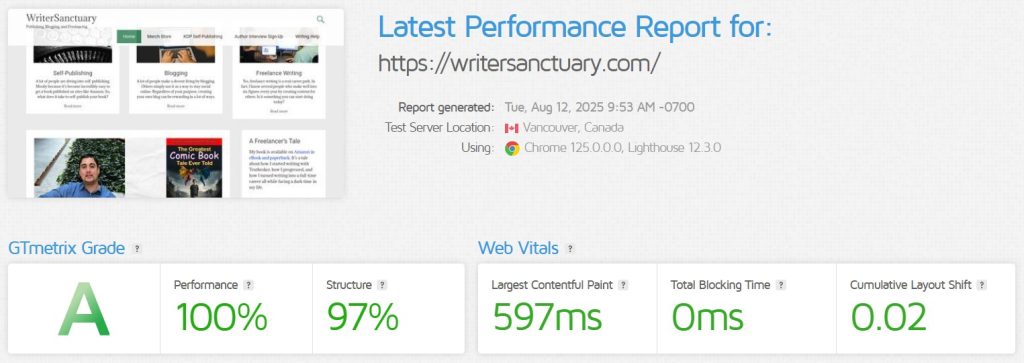
Michael also reported that GTMetrix recorded the “Fully Loaded” times at 15.15 seconds before the move and 5.2 seconds after. Again, this was before he made any changes to the sites aside from simply moving them from one host to another.

WriterSanctuary GTMetrix

Even the response time of WordPress was faster on GreenGeeks. It didn’t take forever for the admin panel to load, and it was like a completely different website. I was blown away.

Easy-to-Use Dashboard

Michael found the dashboard easy to manage for his many blogs. With access to cPanel, he can make changes directly to the sites through the File Manager. He has also used the Staging features to set up temporary sites to test plugins and settings before implementing them live.

Although he never used the new WordPress installer, he did find using the Softaculous addition of cPanel quite easy to use.

It almost makes me wish I had another website to build. The new WordPress creator looks pretty cool, as I’ve played around with it on a sample site. It looks much easier than anything else I’ve used since I started using WordPress in 2011.

Our online chat support is also a key feature for Michael. He has used it a few times, and all of his issues were resolved quickly. And since he could access it from the dashboard, it was quick and easy to get online help without waiting for hours.

The chat support is always amazing and responds relatively quickly. GreenGeeks’ support is so much faster than my old web host.

Future Plans for WriterSanctuary and GreenGeeks

Michael has a lot of plans for WriterSanctuary, going well beyond a simple blog. And he’s excited to build the site using GreenGeeks as its foundation to create something meaningful.

Like any long-lasting house, you need a strong foundation upon which to build. That’s how I see GreenGeeks. Stable servers, fast response times, and a “handyman” at the ready allows you to build just about anything on the Internet.

In a way, your web host offers digital real estate to build your online presence. The website would be the building that your visitors enter and explore. And the more welcoming the establishment, the more often those visitors will return.

Although building that website is entirely up to you, GreenGeeks offers that solid base to create a wide range of sites for almost any need.

Scalable Hosting Plans

As WriterSanctaury continues to grow, it will outpace what is suitable for a shared hosting account. In this environment, Michael is sharing the resources of the server, which can accommodate a few hundred visits per day.

However, there will come a point when expansion is necessary, and GreenGeeks makes that scalability easy and seamless.

I want WriterSanctuary to be more than just a blog about writing. With the plans I have in place, I’m going to need to scale up at some point. Luckily, GreenGeeks offers ways to go beyond a simple shared hosting plan.

eCommerce, Social Media, & Online Courses

The top three expansions for Michael and WriterSanctuary include eCommerce, a social hub of sorts, and offering online courses. Each one will come in due time, as he mulls over which to implement first.

The hardest part is deciding whether I want to keep it all centered on WordPress or use one of the many pieces of software in Softaculous. For instance, I can install Moodle as an LMS for online courses from Softaculous, or I can use one of many WordPress plugins to add them.

There are a lot of options available, and I’ll have to spend a bit of time figuring out which ones are going to work best for my needs.

Building a Brand Based on Writing

WriterSanctuary focuses on helping people who want to learn more about freelance writing, blogging, and self-publishing. However, there is much to explore when building such a brand, especially if you want to produce more than just a blog.

The website is your base of operations. Creating an intricate web of marketing for your content should eventually lead visitors back to your site. Whether you’re selling books or promoting a newsletter, it all evolves around your domain.

With GreenGeeks, I can rest easy knowing that visitors and fans can visit my site and quickly find what they need. And as I expand what WriterSanctuary offers, I know that GreenGeeks has my back. I feel like more than just a customer to them.

Michael is looking forward to expanding his brand to include various products and services. With what we have available here at GreenGeeks, we’re able to accommodate all of his needs as WriterSanctuary continues to grow.

Key Reasons Why WriterSanctuary Continues Using GreenGeeks

According to Michael, he continues to use GreenGeeks because of:

  • Affordability
    Paying three years in advance breaks down to spending less than a cup of coffee each month to maintain the site.
  • Reliability
    GreenGeeks has been far more reliable than my previous host, which was part of the reason why I left them.
  • Plenty of Growth Potential
    Between scalability and the website builders, I can build almost anything I’d like with GreenGeeks.
  • Awesome Tech Support Staff
    I’ve had a few glitches here and there pop up over the years. But the staff were always able to sort things out very quickly.
  • Green Hosting
    I’ve always been conscious about the environment, and I love the idea of putting green energy back into the grid as well as planting trees.

A Good Foundation to Grow On

A building is only as strong as the foundation on which it’s built. And GreenGeeks goes out of its way to ensure that the foundation is strong enough to support a customer’s needs. In the case of WriterSanctuary, GreenGeeks also offers scalable solutions that grow with a client.

From adding eCommerce to building a Wiki about your favorite television show, there is nothing you can’t accomplish with the right host. And I’m thankful of the support and flexibility GreenGeeks has offered over the years. I’m looking forward to what we can accomplish together in the years to come.

If you are interested in seeing how we can help you, feel free to reach out. We’d love to hear from you.

The post Instantly Boosting Performance By 296% to a Writing Blog appeared first on GreenGeeks Blog.

Share:

WordCamp US in Portland for 2025!

For the second year in a row, WordCamp US will be held in Portland, Oregon. It runs from August 26th through the 29th, and we’ll be there in person. And like last year’s camp, this one will be held at the Oregon Convention Center near the Willamette River.

Our very own Ericka and Alex will be attending our table, ready to hand out some swag and talk about WordPress!

What to Expect from WordCamp US 2025

This year, there are a lot of talks about how you can use AI to help with everything from coding to writing content. And although I don’t support generative AI in the creative space, I see the value in using artificial intelligence as a tool to help you accomplish a task.

AI isn’t the only thing waiting for you at this camp, however. There are talks for PHP development, multisite management, and block usage in the WordPress environment.

Some of the talks that caught my attention for 2025 include:

  • Launch Your Personal Portfolio — A Hands-On WordPress Workshop
    In this workshop, Jamie Marsland shows how to build and launch a professional portfolio website that works for a variety of developmental careers. By signing up and attending, you’ll get a fully functional portfolio site and a free year of hosting!
  • Catch Bugs Faster with AI & Playwright (No Hype, Just Results)
    When it comes to quality assurance, AI can help find bugs and issues that the human eye might miss. In this session, Wendy Erdheim-Poch shows how to use AI and Playwrite, not as a replacement for human control, but as a tool to build better sites and apps.
  • What’s Trending Isn’t Always What Matters: How AI Fails Community Publishers
    There are some things that AI gets wrong, and prioritizing trends isn’t always the best approach. Ayobami Iroko dives into why niche publishers need to play more of a part in controlling what AI assumes is valid content.
  • Creators Around a Campfire: How WordPress YouTubers Are Shaping the Ecosystem
    This one hits close to home, as I manage a YouTube channel that focuses on self-publishing, blogging, and freelance writing. I also push a lot of WordPress-specific content, and I would love to be a part of this talk. Anne McCarthy connects other YouTubers to help solidify a community mindset for WordPress creators.
  • Fixing and Optimizing Websites with AI
    AI doesn’t just create content from a prompt. It can also help optimize and fix problems with a website, vastly reducing the amount of time it takes someone to do the same tasks. In this talk, Arnas Donauskas will guide you through the ways to use AI as a tool. This includes things you should automate on your site.

These are just some of the talks and workshops going on this year at WordCamp US 2025. The four-day event has a lot more to it, and there is something for everyone, whether you’re a novice creator or a seasoned vet.

The only problem is that a lot of the ones I find interesting happen at the same time in different rooms. Luckily, some of them might be shown on WordPress.tv, so we can catch up on what was missed.

While in Oregon for the WordCamp…

Oregon has a lot of beautiful scenery, both natural and man-made. Since you’re in town for WorCamp 2025 anyway, you might as well spend the following weekend exploring some of the amazing attractions.

For instance, you can:

  • Explore the waterfalls. Oregon has a lot of magnificent waterfalls tucked away in an incredible natural scenery. Some of the most amazing are near the Portland area, such as Romona Falls.
  • Take a guided tour of the Oregon coast. The Pacific Ocean is an incredible sight, and the Oregon coast amplifies the experience with some exceptionally beautiful landscapes and shores.
  • Visiting the Shanghai Tunnels. This haunted location once connected businesses and hotels with a dark history. Then, you can return to the resturaunt for some tastings and a pint of local beer. Sounds like a great weekend, to me.

This is just a microscopic list compared of the things you can do and explore in and around the Portland area. If you’re new to Oregon, it’s definitely worth taking a day or two and checking out some of the sites.

Have a Great Camp, and We Hope to See You There!

Don’t forget to stop by and say hello to Erika and Alex attending our table at WordCamp 2025 in Portland. They are eager to hang out and talk about WordPress as well as GreenGeeks.

I’d like to take a second to thank the organizers, sponsors, volunteers, and patrons who take the time to make these WordCamps happen. It’s your support that makes this one of the best communities on the planet.

Have a great time in Portland, and we hope to see you there!

The post WordCamp US in Portland for 2025! appeared first on GreenGeeks Blog.

Share:

Shock Hosting Review 2025: Affordable and Quietly Reliable—But Does It Deliver Enough?

Shock Hosting may not be a household name, but it’s been gaining quiet momentum among developers and privacy-conscious users. With a focus on budget-friendly cloud hosting, DDoS protection, and offshore privacy options, it targets users who want decent performance without the hefty price tag. In this 2025 review, we’ll assess Shock Hosting based on performance, support, pricing, usability, and unique features—so you can decide if it’s a smart choice for your website.

Performance and Uptime

Shock Hosting utilizes cloud-based SSD storage with data centers in the U.S. (New Jersey, Los Angeles, Dallas), Canada, the Netherlands, the UK, and Romania (for offshore hosting). These locations offer reasonable global coverage, particularly for U.S. and European audiences.

The average uptime is reported at 99.95%, and page load times range from 700–950 milliseconds, depending on the server location and the CMS in use. Performance is decent but not exceptional—especially on entry-level shared hosting, which lacks built-in server-side caching.

All hosting plans come with:

  • SSD storage

  • Free DDoS protection

  • Cloudflare CDN (manual setup required)

  • cPanel access

Still, unless you're on a VPS or cloud plan, you’ll need to optimize performance yourself.

Performance Summary (2025)

Metric Shock Hosting Industry Average WPX Hosting
Uptime 99.95% 99.90% 99.99%
Avg. Load Time 750–950 ms 850 ms 500 ms
Global Servers 6+ Locations 5+ Global
CDN Support Manual Cloudflare Varies Built-in

Customer Support Experience

Shock Hosting provides 24/7 support via:

  • Live chat

  • Ticket system

  • Email

Response times are fairly quick (under 2 minutes on live chat), and support staff are friendly and capable. However, advanced troubleshooting may require ticket escalation. Their support is developer-friendly but not as hand-holding as that of beginner-oriented providers like ChemiCloud or WPX.

The knowledge base is functional but somewhat thin in depth. New users may find it lacking in guided tutorials or onboarding help.

Pricing and Value for Money

Shock Hosting is competitively priced and offers monthly billing with no long-term contracts required. It stands out for combining privacy features, offshore hosting, and unmetered resources at entry-level prices.

Plan Monthly Price Yearly Price (Discounted) Key Features
Starter $2.99 $2.49/mo 1 Domain, 15 GB SSD, DDoS Protection
Pro $4.99 $4.24/mo Unlimited Sites, More Disk/CPU
Business $6.99 $5.99/mo Better isolation, More Performance

Included on all plans:

  • Free SSL

  • Free migration

  • Daily backups

  • DDoS protection (included—not upsold)

  • Offshore hosting options (Romania, Netherlands)

For the price, it’s a strong value, especially if you prioritize privacy or want offshore hosting. However, no LiteSpeed or built-in caching is a limitation for performance-focused users.

User Interface and Ease of Use

Shock Hosting uses the standard cPanel interface paired with a clean and simple billing panel. While not flashy, it’s effective and easy to navigate.

Website setup is straightforward:

  • One-click installs via Softaculous

  • Email hosting included

  • SSH access available on higher plans

Beginners might miss features like a guided setup wizard or built-in performance tuning. Developers, however, will appreciate access to Git, Cron jobs, and manual configuration tools.

The experience is no-frills, but that simplicity may be a plus for users who value control over aesthetics.

Unique Features

Shock Hosting has a few standout offerings that appeal to niche audiences:

  • Offshore Hosting: Ideal for users concerned about data privacy or legal restrictions.

  • Free DDoS Protection: Included at no cost across all plans.

  • Monthly Billing Options: A rarity among hosts that push annual commitments.

  • Custom Hosting Packages: Flexible VPS and cloud hosting configurations.

  • Unbranded Reseller Hosting: For agencies and developers looking to resell hosting without revealing the backend provider.

That said, it lacks features like LiteSpeed servers, proactive malware scanning, or custom dashboards—features that premium hosts like WPX Hosting include by default.

Key Takeaways

  • ✅ Affordable cloud SSD hosting with monthly plans

  • ✅ Offshore server options for privacy-focused users

  • ✅ Free daily backups, SSL, and DDoS protection

  • ✅ Developer-friendly backend tools

  • ❌ No built-in caching or speed optimization

  • ❌ No LiteSpeed or performance-focused stack

  • ❌ Basic support documentation and UI

Conclusion

Shock Hosting is an excellent choice for users looking for budget hosting with privacy, flexibility, and unmetered resources. It offers a developer-friendly environment with decent performance and strong uptime, all wrapped in a no-nonsense, contract-free model.

However, if you’re a beginner looking for guided setup or a business owner needing blazing-fast speed and proactive support, Shock Hosting may fall short. For those needs, a premium host like WPX Hosting provides better overall value—especially for WordPress websites, ecommerce stores, or mission-critical projects.

In summary, Shock Hosting is best for developers, resellers, and users who know what they’re doing and want control at a low price. It’s not flashy—but it’s solid, stable, and surprisingly feature-rich for the cost.

Share:

ChemiCloud Web Hosting Review 2025: Fast, Friendly, and Feature-Rich—But Is It Enough for Growth?

ChemiCloud may not be the most well-known web hosting provider, but it has quietly built a strong reputation for speedy cloud-based hosting, excellent customer service, and generous features. With SSD storage, a modern UI, and server locations around the world, ChemiCloud aims to offer premium-level hosting at mid-tier prices. In this 2025 review, we’ll evaluate ChemiCloud across five key categories: performance, support, pricing, ease of use, and unique features—to help you determine if it’s a smart choice for your website.

Performance and Uptime

ChemiCloud hosts all websites on cloud-based SSD servers with data centers in nine global locations, including New York, London, Amsterdam, Singapore, Bangalore, and Toronto. This reach allows for localized performance and reduced latency for international visitors.

Over the past year, ChemiCloud has delivered an average uptime of 99.98%, with page load speeds typically ranging from 450–700 milliseconds, depending on location and site complexity. The Turbo plan, which includes LiteSpeed servers and advanced caching (LSCache), performs especially well for WordPress and dynamic sites.

Other technologies boosting performance:

  • LiteSpeed Web Server (Turbo plans)

  • Free Cloudflare CDN

  • HTTP/3 and Brotli compression

  • LSCache plugin for WordPress optimization

Performance Snapshot (2025)

Metric ChemiCloud Industry Average WPX Hosting
Uptime 99.98% 99.90% 99.99%
Avg. Load Time 500–700 ms 850 ms 500 ms
Server Stack LiteSpeed/NGINX Apache/nginx LiteSpeed
CDN Cloudflare (Free) Varies Custom CDN

Customer Support Experience

ChemiCloud consistently earns praise for its fast and friendly support team. Available 24/7 via:

  • Live chat (responses in under 30 seconds)

  • Email/ticket system

Unlike many providers, ChemiCloud avoids canned responses. Support agents are highly responsive and knowledgeable about WordPress, email setup, domain issues, and migrations. They also offer free website migration on all plans, completed within 24 hours.

The knowledge base is helpful, although smaller than some competitors. Still, most users rarely need to reference it due to strong live support.

Pricing and Value for Money

ChemiCloud’s pricing sits between budget and premium tiers. All plans include a generous feature set, even at the entry level. However, like many hosts, there is a significant jump in renewal rates after the first term.

Plan Promo Price (Monthly) Renewal Price Key Features
Starter $2.95 $9.95 1 Website, Free CDN, Daily Backups
Pro $4.95 $14.95 Unlimited Sites, 2x CPU/RAM, Domain Privacy
Turbo $6.95 $19.95 LiteSpeed, LSCache, Object Caching, Fewer Accounts

Included in all plans:

  • Free domain for life (as long as you host with them)

  • Daily backups (retention up to 30 days)

  • Free SSL certificates

  • Email hosting

  • One-click installs

Although it’s not the cheapest, ChemiCloud provides great value, especially for users who prioritize speed and support.

User Interface and Ease of Use

ChemiCloud uses a custom dashboard layered over cPanel, giving users a clean, intuitive interface without sacrificing the power of cPanel tools.

For beginners:

  • WordPress and other CMS installs are available via Softaculous

  • One-click staging and cloning tools are included on Pro and Turbo plans

  • Guided onboarding with helpful tooltips

For developers:

  • SSH access, Git, WP-CLI, Cron jobs, and Composer support

  • PHP version selector

  • Access logs and manual configuration options

The interface feels more modern and refined than other cPanel-based hosts like Hostwinds or HostArmada, though not as seamless as WPX Hosting’s proprietary dashboard.

Unique Features

ChemiCloud distinguishes itself with a mix of premium tools and a customer-focused experience:

  • Free Domain for Life: Renewed annually as long as you remain a customer.

  • LiteSpeed + LSCache: Boosts WordPress and WooCommerce speed, only on Turbo plans.

  • Daily Backups: Retained for up to 30 days—an unusually long window at no added cost.

  • Multiple Server Locations: Choose your preferred data center during signup for better performance.

  • Strong Security Stack: Imunify360 protection, DDoS mitigation, firewall rules, and proactive server monitoring.

These features reflect a commitment to quality—without pushing constant upsells.

Key Takeaways

  • ✅ Global data centers and fast cloud SSD hosting

  • ✅ Excellent customer support and free site migrations

  • ✅ Free daily backups, SSLs, and domain for life

  • ✅ LiteSpeed + LSCache on Turbo plan for speed boost

  • ❌ High renewal pricing after promo term

  • ❌ LiteSpeed available only on highest-tier plan

  • ❌ No VPS or dedicated hosting options (shared/cloud only)

Conclusion

ChemiCloud is a high-performing, customer-friendly host ideal for bloggers, small businesses, and WordPress users looking for reliability, speed, and solid support. Its cloud-first infrastructure, user-friendly dashboard, and global reach make it especially attractive to those who want more than basic hosting without jumping to enterprise pricing.

That said, it's not for everyone. If you need VPS, reseller, or custom configurations, ChemiCloud might feel limiting. And if renewal cost is a concern, you’ll need to plan ahead to avoid sticker shock.

For users who want faster speeds, top-tier WordPress performance, and support ready to fix things at any hour, WPX Hosting remains the stronger pick—offering better value for larger or performance-heavy sites.

Still, ChemiCloud shines as one of the best shared cloud hosts in its class—especially for those who appreciate premium features and personal service in a simplified package.

Share:

Hostwinds Web Hosting Review 2025: Affordable Hosting With Solid Performance—but Is It Enough?

Hostwinds has built a reputation for offering versatile hosting solutions, ranging from budget-friendly shared hosting to powerful VPS and dedicated servers. While it doesn’t get as much attention as bigger brands, Hostwinds caters well to both beginners and developers with its scalable infrastructure, customizable plans, and generous resource allocations. This 2025 review explores how Hostwinds performs in terms of uptime, support, pricing, usability, and standout features—so you can decide if it's the right host for your site.

Performance and Uptime

Hostwinds uses SSD-based infrastructure across its data centers in Dallas, Seattle, and Amsterdam. Although it lacks the global reach of some competitors, it compensates with solid uptime and decent server response speeds.

Over the past year, Hostwinds has maintained an average uptime of 99.96%, which aligns well with industry expectations. Page load speeds range between 650–900 milliseconds, depending on the server location and website complexity.

All shared hosting plans include:

  • SSD storage

  • Free Cloudflare CDN

  • LiteSpeed-compatible infrastructure (though Apache is the default)

  • Unmetered bandwidth

Still, Hostwinds doesn’t offer built-in server-side caching on shared plans unless you configure it manually, which can limit performance out of the box.

Performance Overview (2025 Benchmarks)

Metric Hostwinds Industry Average WPX Hosting
Uptime 99.96% 99.90% 99.99%
Avg. Load Time 700–900 ms 850 ms 500 ms
Data Center Regions 3 (US/EU) 5+ Global
Server Caching Manual setup Varies Built-in

Customer Support Experience

Hostwinds provides 24/7/365 support via:

  • Live chat

  • Tickets

  • Phone support

Support quality is generally good, with most users reporting quick response times on live chat (within 2 minutes). However, the depth of assistance varies—simple queries are resolved fast, while complex technical issues sometimes involve back-and-forth with multiple agents.

Hostwinds also has an extensive knowledge base, but it’s somewhat outdated in certain areas, especially when it comes to newer tools or updated interfaces.

Overall, support is dependable, though not as polished or proactive as what you’d get with WPX Hosting, which specializes in hands-on WordPress assistance.

Pricing and Value for Money

Hostwinds promotes a low-cost entry point, and it stands out by offering month-to-month billing—a rarity among competitors who force long-term contracts for lower pricing.

Plan Monthly Price Yearly Price (Discounted) Key Features
Basic $6.74 $4.99/mo 1 Domain, Unmetered Disk & Bandwidth
Advanced $8.24 $5.64/mo 4 Domains, Softaculous, SSL
Ultimate $9.74 $6.74/mo Unlimited Domains, All Features Unlocked

Included across all plans:

  • Unlimited bandwidth

  • Free website transfer

  • Free SSL certificate

  • Nightly backups (additional cost)

  • Softaculous installer

The downside? Features like backups, monitoring, and cloud load balancing cost extra—so the price may creep up if you need more protection or speed.

User Interface and Ease of Use

Hostwinds uses cPanel for website management, which is standard but not especially modern. The customer billing and service dashboard is clear, though it lacks the streamlined UX found on platforms like WPX or Kinsta.

Beginners may face a small learning curve, especially when trying to set up caching or configure SSL beyond default settings. On the flip side, developers will appreciate:

  • SSH access

  • Python, Node.js, and Ruby support

  • Cron jobs and custom script handling

For WordPress users, Hostwinds offers easy 1-click installation but doesn’t optimize hosting specifically for WordPress like WPX does.

Unique Features

Hostwinds offers flexibility that appeals to tech-savvy users and growing businesses:

  • True Pay-As-You-Go Hosting: No need to lock into long contracts.

  • Unmetered Resources: Disk space and bandwidth are not capped.

  • Customizable VPS and Cloud Hosting: Users can configure storage, memory, and bandwidth as needed.

  • White Label Reseller Hosting: Includes a private-label setup for resellers with WHMCS integration.

What’s missing are automatic caching, global server reach, and robust WordPress-specific features—all things WPX provides as standard.

Key Takeaways

  • ✅ Affordable monthly billing—no long-term contracts required

  • ✅ Reliable performance (99.96% uptime) and SSD-powered servers

  • ✅ Scalable hosting from shared to VPS/dedicated

  • ✅ Developer-friendly with SSH, script support, and customization

  • ❌ Caching and backups require manual setup or paid add-ons

  • ❌ Limited server locations outside the U.S. and Europe

  • ❌ No WordPress-specific optimization tools included

Conclusion

Hostwinds is a reliable, low-cost hosting provider that delivers flexible, unmetered shared hosting and developer tools at a fair price. Its standout feature is monthly billing with no commitment, making it attractive to freelancers, small business owners, and side projects that don’t need enterprise-grade performance.

However, it doesn’t offer built-in performance tuning or WordPress-centric features that modern website owners increasingly expect. If you value speed, premium support, and optimized WordPress hosting, WPX Hosting remains a stronger choice. It includes everything out of the box: LiteSpeed servers, advanced caching, malware removal, and one of the best support teams in the business.

In short, Hostwinds is best for developers and budget-conscious users who are comfortable configuring their own environment. If you need more hands-off performance and optimization, it may be worth paying extra for a higher-tier alternative.

Share:

HostArmada Web Hosting Review 2025: Underrated Speed and Security with Room to Grow

HostArmada is a relatively new player in the hosting space, but it's gaining attention for its focus on cloud-powered infrastructure, aggressive pricing, and strong customer support. With SSD storage, free daily backups, and performance-enhancing features across all plans, HostArmada appeals to both beginners and experienced developers. In this 2025 review, we’ll break down its performance, support, pricing, ease of use, and unique offerings to help you decide whether it's worth your investment.

Performance and Uptime

HostArmada’s infrastructure is built on cloud-based SSD servers spread across 9 global data centers in cities such as Dallas, London, Frankfurt, Singapore, and Sydney. Its cloud architecture provides redundancy and higher stability, which leads to improved uptime and reliability.

Real-world uptime monitoring shows uptime averaging 99.97%, meeting expectations for modern cloud hosting. Page load times fall between 550–800 milliseconds, depending on location and the chosen plan.

Unlike many shared hosts, HostArmada limits the number of users per server, especially on higher-tier plans. Combined with NGINX and LiteSpeed (depending on plan), this helps maintain consistent speed.

Performance Metrics (2025 Overview)

Metric HostArmada Industry Average WPX Hosting
Uptime 99.97% 99.90% 99.99%
Avg. Load Time 650 ms 850 ms 500 ms
Server Stack NGINX/LiteSpeed Apache/nginx LiteSpeed
SSD Cloud Hosting Yes Varies Yes

Note: LiteSpeed is only available on the Speed Reaper plan, while lower tiers use NGINX with Apache backend.

Customer Support Experience

HostArmada consistently earns high praise for its fast, knowledgeable, and friendly support. They provide 24/7 support via:

  • Live chat (average response time < 30 seconds)

  • Tickets

  • Phone

What sets them apart is the thoroughness of their technical assistance, even for beginner-level questions. Their team is well-versed in WordPress, email configuration, and database issues. Many users mention that they avoid “copy-paste” replies and actually walk through custom solutions.

In addition, their documentation is growing and well-organized, covering tutorials, hosting basics, and CMS installations.

Pricing and Value for Money

HostArmada’s pricing is competitive—especially for first-time users—but renewal prices increase significantly. However, unlike some hosts, it’s upfront about this in its pricing tables.

Plan Promo Price (Monthly) Renewal Price Key Features
Start Dock $2.49 $9.95 1 Website, NGINX, Free SSL, Daily Backups
Web Warp $4.11 $13.95 Unlimited Sites, More CPU/RAM, Dynamic Caching
Speed Reaper $5.39 $17.95 LiteSpeed, Brotli, 3x Speed, Fewer Users

All plans include:

  • Free domain (1 year)

  • Daily backups (7–21 days retention)

  • Unlimited email accounts

  • Malware scans

  • cPanel access

While the Speed Reaper plan offers the most performance, even the Start Dock plan includes SSD storage, free backups, and malware protection—features usually hidden behind paywalls elsewhere.

User Interface and Ease of Use

HostArmada uses cPanel as its primary control panel, which is familiar but slightly dated. However, the overall account dashboard is clean, easy to navigate, and integrates smoothly with support tickets and billing.

Website setup is beginner-friendly thanks to:

  • Softaculous installer

  • Pre-installed optimization plugins (on WordPress)

  • Step-by-step onboarding email series

There’s also SSH, WP-CLI, Git, and staging environments on higher-tier plans, making it suitable for developers.

However, unlike WPX Hosting, there’s no custom dashboard or proprietary panel, which may feel limiting for those wanting a streamlined UX experience.

Unique Features

HostArmada brings a mix of performance and security to the table, with several features that distinguish it from other mid-tier hosts:

  • Cloud-Based Shared Hosting: Even basic plans are cloud-based with isolated environments, reducing the chance of performance drops due to noisy neighbors.

  • Free Daily Backups on All Plans: Automatically retained up to 21 days, depending on plan.

  • LiteSpeed Servers on Premium Plan: Delivers a big speed boost, though limited to Speed Reaper.

  • Free Malware Removal: Available on all plans—a rare bonus in shared hosting.

  • Reduced Server Load: Strict limits on users per server increase resource availability and speed.

Key Takeaways

  • ✅ Cloud SSD architecture for all plans = stable and fast performance

  • ✅ Outstanding 24/7 support with human-first approach

  • ✅ Free daily backups, malware scans, and SSLs

  • ✅ Fair intro pricing with transparent renewal costs

  • ❌ LiteSpeed only on top-tier plan

  • ❌ cPanel UI may feel outdated

  • ❌ No monthly billing (only annual or longer on first purchase)

Conclusion

HostArmada offers a well-rounded hosting experience focused on performance, security, and strong customer support. Its cloud-first approach and generous resource allocations, even on lower-tier plans, make it an excellent option for personal sites, blogs, and growing small businesses.

However, if speed is your top priority and you want LiteSpeed caching across all plans, you’ll need to opt for the Speed Reaper plan—or consider a premium host like WPX Hosting, which delivers blazing-fast load times (~500ms), a proprietary dashboard, and world-class WordPress support right out of the gate.

Still, for those looking for reliable, secure, and transparent hosting at a fair price, HostArmada is a solid contender. It's especially appealing if you’re tired of unexpected fees and want excellent support from day one. Just remember to weigh renewal pricing and server stack when choosing your plan.

Share:

FastComet Web Hosting Review 2025: Speedy and Reliable, But Is It Worth It?

FastComet is a lesser-known web hosting provider that has steadily gained traction for its global data center network, strong security features, and high-speed performance at reasonable prices. As of 2025, it competes with mid-tier and premium hosts by promising robust features and stable performance. In this review, we’ll evaluate FastComet across key criteria: performance, support, pricing, ease of use, and standout features to help you decide if it's the right host for your website.

Performance and Uptime

FastComet stands out with 11 global data centers, including locations in the U.S., Europe, Asia, and Australia. This global presence ensures lower latency and faster delivery of content, especially for international audiences.

Real-world uptime reports from various monitoring tools suggest FastComet consistently delivers 99.96% to 99.99% uptime, placing it among the more reliable providers in this price range. In terms of speed, sites on FastComet typically load between 500ms and 750ms, depending on the server location and traffic.

FastComet uses a combination of:

  • SSD-only storage (no HDD bottlenecks)

  • Cloudflare CDN integration

  • Advanced server-side caching (FastCloud Extra plan)

  • HTTP/2 and Brotli compression

These technologies contribute to the faster page delivery, especially for WordPress sites.

Performance Snapshot (2025 Data)

Metric FastComet Industry Average WPX Hosting
Uptime 99.98% 99.90% 99.99%
Avg. Load Time 600 ms 850 ms 500 ms
Server Type Apache + NGINX Apache/nginx LiteSpeed

Customer Support Experience

FastComet is known for excellent customer support, often highlighted in user reviews. They offer 24/7 assistance via:

  • Live chat

  • Email/ticketing

  • Phone support

Live chat response times are typically under 30 seconds, and the support team is well-trained, especially with WordPress, Magento, and Joomla-related questions. There’s also a solid knowledge base and community forum for self-help.

What stands out is the personalized support approach—FastComet assigns technical support reps who often follow up and reference your past issues, providing continuity in service.

Pricing and Value for Money

FastComet offers three shared hosting plans under the FastCloud branding. Unlike many providers, they do not hike up renewal prices drastically, which adds to their long-term value.

Plan Price (Monthly) Renewal Price Key Features
FastCloud $2.95 $2.95 1 Website, 15 GB SSD, Free SSL, Daily Backups
FastCloud Plus $4.45 $4.45 Multiple Sites, More CPU, Speed Boost
FastCloud Extra $5.95 $5.95 3x CPU/RAM, Dynamic Caching, RocketBooster

All plans include:

  • Free domain transfer

  • Daily backups

  • BitNinja server security

  • Malware scan & removal

  • Free Cloudflare CDN

Compared to similar hosts, FastComet delivers good value, especially with performance tools included even at low tiers.

User Interface and Ease of Use

FastComet uses the cPanel interface, which is familiar to many users but does not offer a custom dashboard. While this may not appeal to those looking for a modern UI like WPX Hosting offers, the platform is intuitive enough for beginners and functional for developers.

The account dashboard integrates well with billing, domain management, and support. For site installs, they use Softaculous, offering over 400+ scripts, making it easy to install CMS platforms like WordPress, Drupal, or PrestaShop.

One useful addition is their SiteBuilder tool for users who want to create websites without coding, though it's basic compared to Wix or Squarespace.

Unique Features

FastComet has a few standout offerings that separate it from its competition:

  • Fixed Pricing Model: No surprise renewal spikes—what you pay now is what you pay later.

  • Free Daily and Weekly Backups: Offered on all plans without an added cost.

  • 11 Data Centers: Locations in Dallas, Frankfurt, Tokyo, Sydney, and more give users flexibility and speed regardless of geography.

  • RocketBooster (FastCloud Extra only): Optimized server stack with fewer users per server, dynamic caching, and Memcached integration.

Additionally, BitNinja security, WAF (Web Application Firewall), and cageFS isolation help secure sites against DDoS, malware, and brute force attacks.

Key Takeaways

  • ✅ Fast, globally distributed performance (11 data centers)

  • ✅ Honest pricing with no sharp renewal hikes

  • ✅ Excellent support with fast live chat

  • ✅ Daily backups and security included

  • ❌ Uses cPanel, which feels dated for some users

  • ❌ Entry-level plan lacks performance features

  • ❌ RocketBooster only on the most expensive plan

Conclusion

FastComet is an impressive hosting provider in 2025 for those who value global performance, fair pricing, and excellent support. With its fixed renewal rates, daily backups, and strong security features, it's especially well-suited for freelancers, bloggers, and small businesses who want peace of mind without breaking the bank.

The main drawbacks are the lack of a modern dashboard and the limited features on the entry-level plan. Power users who want superior caching and performance tools will need to opt for FastCloud Extra.

For those wanting cutting-edge speed and a simplified, WordPress-optimized experience, WPX Hosting remains the gold standard. It offers faster speeds (avg. 500ms), advanced caching on all plans, and one of the best custom dashboards available today.

That said, FastComet delivers a well-rounded hosting experience that combines speed, transparency, and top-tier support—a great choice if you're looking for a trustworthy, long-term hosting partner.

Share:

GreenGeeks Web Hosting Review 2025: Eco-Friendly Performance with a Few Trade-Offs

GreenGeeks has carved out a unique position in the web hosting space by being one of the few companies to focus heavily on environmental sustainability. While the company is best known for its green energy commitment, it also offers competitive hosting features tailored for bloggers, small businesses, and eco-conscious developers. In this review, we’ll evaluate GreenGeeks’ performance, support, pricing, ease of use, and standout features—helping you decide if it’s the right fit in 2025.

Performance and Uptime

Performance is where most users form their first opinion of a host. GreenGeeks advertises a 99.9% uptime guarantee, which is standard in the industry. Real-world data shows that uptime typically hovers between 99.91% and 99.95%, making it fairly reliable for small to medium-sized sites.

When it comes to page load times, GreenGeeks uses SSD storage, LiteSpeed web servers, and built-in caching (LSCache) to improve speed. Websites hosted on their platform load in 600–850 milliseconds on average, which is decent but not the fastest compared to premium hosts like WPX Hosting.

GreenGeeks also offers data centers in multiple locations—Phoenix, Chicago, Montreal, Amsterdam, and Singapore—which helps reduce latency for global audiences.

Key Performance Stats (2025 Estimates)

Metric GreenGeeks Industry Average WPX Hosting
Uptime 99.95% 99.90% 99.99%
Avg. Load Time 800 ms 850 ms 500 ms
Server Type LiteSpeed + LSCache Apache/nginx LiteSpeed

Customer Support Experience

GreenGeeks offers 24/7 support via live chat, email, and tickets. Phone support is available during business hours (9 AM–12 AM EST). The live chat response time is typically under a minute, which is competitive, though some users report that resolution time can vary depending on complexity.

The support team is technically proficient, especially with WordPress-related issues, and they offer free site migrations. However, there have been occasional complaints about canned responses or upselling during problem-solving sessions.

Pricing and Value for Money

GreenGeeks’ pricing structure is tiered and transparent, but like many hosts, it comes with promotional rates that rise significantly upon renewal. For example:

Plan Promo Price (Monthly) Renewal Price Key Features
Lite $2.95 $10.95 1 Website, 50 GB Storage, Free SSL
Pro $4.95 $15.95 Unlimited Websites, Faster Performance
Premium $8.95 $19.95 4x Performance, Object Caching, AlphaSSL

All plans include:

  • Free CDN (Cloudflare)

  • Free nightly backups

  • Free email accounts

  • Free domain for 1 year

While GreenGeeks may seem affordable at first glance, the long-term costs are higher unless you’re locked into a multi-year plan. For example, the Premium Plan renewal at $19.95/month is pricier than some high-performance alternatives.

User Interface and Ease of Use

GreenGeeks uses cPanel, which is familiar and easy for most users, though not the most modern solution. The dashboard is clean but feels slightly outdated compared to the custom dashboards offered by WPX Hosting or SiteGround.

Installing apps like WordPress, Joomla, or Drupal is straightforward with Softaculous one-click installs. Beginners will appreciate the onboarding experience, but more advanced users might find the lack of dashboard customization limiting.

One advantage is the integration of tools like Git, SSH access, and WP-CLI even on the basic plans, which developers may find useful.

Unique Features

What truly sets GreenGeeks apart is its commitment to sustainability:

  • 300% Green Energy Match: GreenGeeks purchases three times the energy it consumes in renewable energy credits. It’s one of the only hosts to go beyond carbon neutrality.

  • Tree Planting Program: A tree is planted for every new hosting account.

  • EcoSite Pro Optimization: Tailored for WordPress and e-commerce performance.

GreenGeeks also emphasizes environmental compliance in its data centers and operations, which makes it appealing to eco-conscious entrepreneurs and developers.

Another standout is free nightly backups, even on the lowest-tier plan. That’s a bonus that many competitors charge extra for.

Key Takeaways

  • ✅ Excellent eco-friendly hosting credentials (300% renewable match)

  • ✅ Solid uptime (99.95%) and decent load times (~800ms)

  • ✅ Free backups and SSLs even on entry plans

  • ❌ Higher renewal prices than advertised

  • ❌ Interface feels dated compared to modern dashboards

  • ❌ Live chat can sometimes feel scripted

Conclusion

GreenGeeks is a solid choice for users who prioritize sustainability without compromising too much on performance. It balances good uptime, a user-friendly setup, and standout green initiatives—making it especially suitable for environmentally conscious bloggers, nonprofits, and small businesses.

That said, GreenGeeks isn’t perfect. Its higher renewal rates, lack of a custom dashboard, and occasionally average support responsiveness may turn off power users or those seeking lightning-fast performance.

If eco-friendliness is your top priority, GreenGeeks is one of the best green hosting providers available. But if you’re looking for premium performance, faster speeds, and a more modern UI, consider WPX Hosting instead—it consistently outpaces competitors in real-world speed tests and customer satisfaction.

Ultimately, GreenGeeks delivers what it promises: reliable hosting with an environmental conscience. Just be aware of the pricing jumps and limitations before you commit to a long-term plan.

Share:

WPX Hosting Review (2025): A Reliable Choice or Overhyped?

In today’s fast-paced digital world, choosing the right web hosting provider can make or break your online presence. WPX Hosting has gained popularity in recent years, especially among bloggers, marketers, and small business owners looking for high-performance WordPress hosting. But does WPX still live up to the hype in 2025? This review takes a detailed look at its performance, support, pricing, usability, and standout features to help you decide.

Performance and Uptime

One of the biggest promises WPX makes is blazing-fast website loading speeds. According to independent tests, WPX Hosting consistently delivers excellent performance:

Metric WPX Hosting (2025 Average) Industry Standard
Average Load Time 350 ms 750 ms
Uptime Guarantee 99.95% 99.9%
Real Uptime (Last 6 Mo) 99.98% 99.9%

WPX achieves these results thanks to its custom-built high-speed content delivery network (WPX Cloud), SSD-based servers, and LiteSpeed web server technology.

Key Takeaway: WPX Hosting offers exceptional speed and near-perfect uptime, making it ideal for websites that prioritize performance, such as online stores or content-heavy blogs.


Customer Support Experience

WPX Hosting has built a solid reputation for responsive customer support. They offer 24/7/365 live chat support, with response times averaging under 30 seconds.

Testers and real users report that their support team is not only fast but also technically capable. WPX staff are trained to resolve complex issues such as site migration, malware removal, and DNS troubleshooting without passing users between multiple departments.

Pros:

  • Real-time, expert help (live chat or support tickets)

  • Free unlimited website migrations (usually completed within 24 hours)

  • Free malware removal in case of infections

Cons:

  • No phone support, which some users might prefer

  • Support is mainly focused on WordPress users

Key Takeaway: WPX Hosting provides fast, professional support around the clock, though it may not suit users looking for traditional phone support.


Pricing and Value for Money

WPX Hosting offers managed WordPress hosting, which naturally comes at a higher cost than shared hosting. Here's a breakdown of their current pricing:

Plan Price (Monthly) Websites Allowed Storage Bandwidth Free Features
Business $24.99 5 15 GB 200 GB SSL, CDN, Site Migrations
Professional $49.99 15 30 GB 400 GB Daily Backups, Malware Fixes
Elite $99.00 35 60 GB Unlimited WPX Cloud, 24/7 Support

Though not cheap, WPX provides real value through its bundled features that competitors often charge extra for—such as advanced malware cleanup, lightning-fast site migration, and high-speed CDN.

Key Takeaway: WPX Hosting isn’t the cheapest, but the level of performance and support you get justifies the price, especially for businesses that rely on uptime and speed.


User Interface and Ease of Use

Unlike some hosting dashboards that overwhelm new users with options, WPX has a custom dashboard that is clean and easy to navigate. It's designed with simplicity in mind—perfect for bloggers, solopreneurs, and small businesses.

Highlights:

  • One-click WordPress installs

  • Simple DNS management

  • Integrated file manager and database tools

  • Visual layout, no cPanel clutter

Users also praise the guided migration process and the intuitive way support interacts via chat.

Key Takeaway: The WPX dashboard is beginner-friendly but powerful enough for advanced users who need to manage multiple sites without hassle.


Unique Features

WPX Hosting goes beyond the basics to offer several premium tools that make it stand out in the crowded hosting market.

WPX Cloud CDN

Their custom-built CDN (Content Delivery Network) ensures that your website loads quickly across the globe. Unlike third-party CDNs, it’s fully integrated and optimized for WPX servers.

Free Malware Removal

Security is a major concern for WordPress users. WPX offers proactive scanning and unlimited malware removal—a service that could otherwise cost you $100 or more per incident with other hosts.

Daily Backups

WPX stores backups for 28 days, allowing users to restore a previous version of their site with just one click.

Free Unlimited Migrations

Whether you’re moving one site or a dozen, WPX’s team will migrate them for free—typically within 24 hours.

Key Takeaway: WPX Hosting’s standout features—like WPX Cloud and malware removal—add real value and reduce the need for external plugins or services.


Conclusion

WPX Hosting remains one of the best-managed WordPress hosting providers in 2025. It combines world-class performance with responsive customer support and a clean user interface. While it’s not the most budget-friendly option, it provides excellent value for anyone who needs reliable uptime, fast speeds, and peace of mind.

Summary Table

Category Rating (Out of 5)
Performance & Uptime 5.0
Customer Support 4.8
Pricing & Value 4.5
Ease of Use 4.7
Features & Innovation 4.9

Should You Choose WPX Hosting?

Yes, if you:

  • Run a WordPress site with growing traffic

  • Need blazing-fast speed and uptime

  • Value premium support and features like malware removal

No, if you:

  • Are just starting out and need budget hosting

  • Don’t use WordPress or prefer more advanced server control

Official Site: Visit WPX Hosting

Share:

Search This Blog

GreenGeeks Blog